39.6 Other Microsimulation Tools
Markov microsimulation is a very broad topic and TreeAge Pro includes numerous microsimulation options and features which may be of interest in select instances.
Markov Termination During Simulation Trials
By default, Markov process calculations terminate during microsimulation trials when either the termination condition is true or a trial enters an absorbing state. It is possible to turn off the latter behavior so that trials will continue processing even after entry into an absorbing state. Changing this default setting is likely to be appropriate in only a few Markov models (e.g., where absorbing states do not correspond to dead states or other endings of the Markov process). This setting is found in the Other Calculation Settings category of the Preferences dialog. The default for this option is checked.
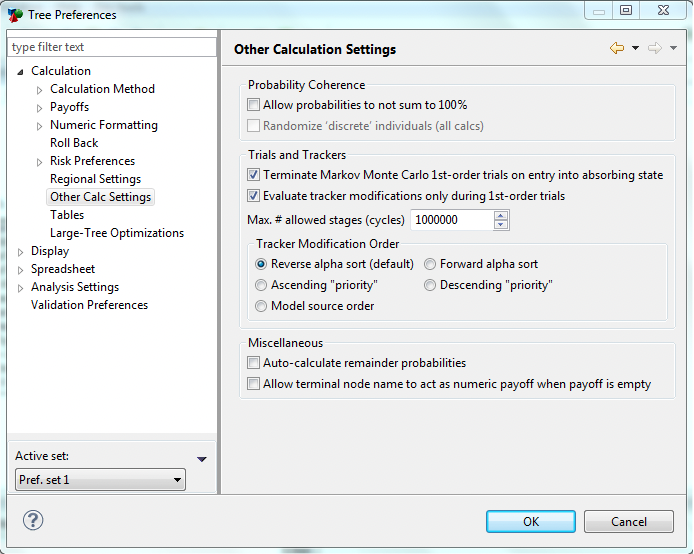
The Terminate upon entry into absorbing state setting generally substitutes for the threshold portion of the default Markov termination condition (i.e., “_stage_eff < 0.001”). The threshold part of the condition should generally be removed for microsimulation models.
Using Logic Nodes in a Markov Microsimulation
A logic node acts like a decision node, in that it selects one path from its branches; rather than looking at expected values, however, it chooses a path by evaluating logical expressions. Starting at the top branch, the first node with an expression that evaluates to true is selected. A simple logic node might have two branches, X and Y, with the expression _stage > 4 below branch X and _stage <=4 (or #) below branch Y. When the logic node is encountered, either branch X or branch Y is followed based on the current value of _stage.
Most logical expressions in Markov processes will reference the values of trackers. For example, in Markov Monte Carlo #2 and #3, a tracker serves to remember the current size of a tumor during a simulation trial, while a logic node determines whether to transition to a Metastatic state based on the value of this tracker.