40.1 Configure the Model for Patient Tracking
The Healthcare example model Markov.Cancer.PatientTracking.trex is configured for Patient Tracking via Tree Preferences. Let's examine the settings.
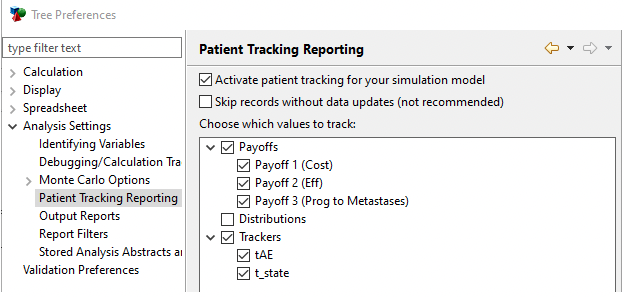
The preferences above are used to turn on/off the recording of time data and to determine what data items to store.
-
Activate patient tracking...: Check to turn on patient tracking. Turn this off when you are finished with the reporting as this option significantly slows down analyses.
-
Skip records without data updates: Check this to limit the number of records stored in the database by skipping records when data has not changed. (We do NOT recommend you check this box).
-
Data Items: Check all the data items you want stored for reporting.
With the selections above, all model data will be recorded.
If you want to store the value of a variable or keyword with Patient Tracking data, use a tracker and set the tracker value to the variable/keyword you want stored. Then include the tracker in Patient Tracking preferences. In this model, the t_state tracker is used to store the value of the _state_index keyword by cycle at each health state.