40.4 Cohort Report
The Cohort Report (for a single strategy) provides details into the flow of individuals through the model. The report uses the identical format as the Markov Cohort Extended Report; however, the data is generated in two different ways.
-
In Markov Cohort Analysis, the Extended Report provides visibility into the internal calculations executed during Markov Cohort Analysis as the cohort moves through the model.
-
In Microsimulation Patient Tracking, the individual patients are aggregated at each node using the individual patient data as each trial passes through specific nodes (state or transition) in each cycle. The aggregated data is then presented as percentages of the cohort and reward accumulation just like the Markov Cohort Extended Report.
We will examine cohort-level patient tracking for the first strategy Tx1. From the Microsimulation results, click Patient tracking reports, select the report type Cohort and click OK. This generates a dashboard very similar to the Markov Cohort Analysis dashboard for cohort models.
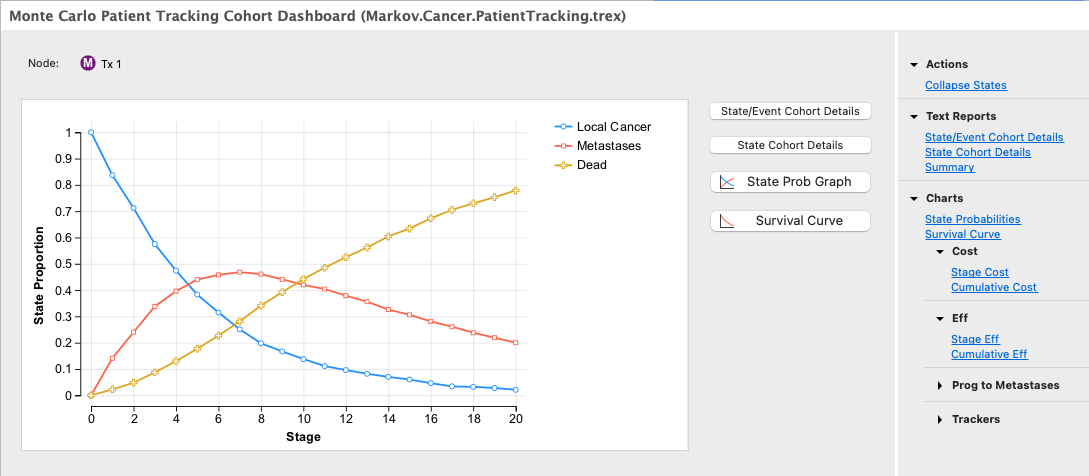
This dashboard provides similar reporting as is available for cohort models. These reports are described in detail in the Markov Model Chapter. This dashboard also provides the ability to Collapse States to merge data from multiple states within the Markov process.
We will examine the most commonly used report here - State/Event Cohort Details.
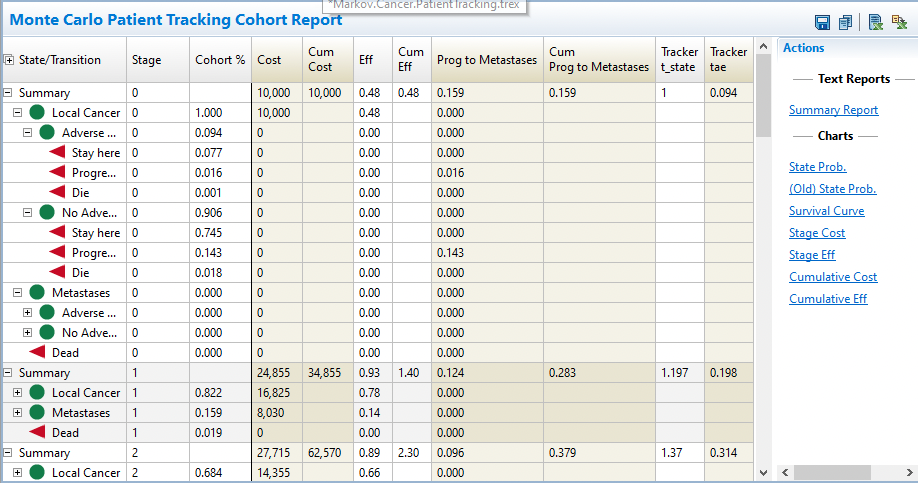
This report accumulates rewards, trackers and payoffs by patient and by node from the individual pathways experiences by the set of simulated patients. The data are presented as averages for the entire patient set - both in the percentage at each node and in the values accumulated at those nodes.
For example, of the 1000 patients that run through the model, 822 patients were still in the Local Cancer state at the beginning of _stage 1, resulting in a cohort percentage of 0.822.
Payoffs are reported at the aggregate level as well. For example, at the start of _stage 0, all 1000 patients are in the Local Cancer state, so the cost from that state is 1000/1000 * 10000 = 10000. Aggregate cost gets harder to track in this model in future cycles as patients progress and experience adverse events.
Individual patients may have trackers that are updated several times per cycle. We can examine each node in detail to see where the trackers are updated using the 'Trial - All Data Items per Time Period' (see later section). However, in this Cohort Report, we can only report the average tracker value for the cohort per cycle.
For example, consider the tracker t_state capturing the state index (via the keyword _state_index) for each trial - 1 for Local, 2 for Metastases and 3 for Dead. There were 1000 trials run through the model and at _stage 0 all trials started in the Local Cancer state. The report will show the average value for tracker t_state using the calculation: 1 * (1000/1000) = 1. For _stage 1, there are 822 patients in Local Cancer State, 159 are in Metastases State and 19 are in the Dead State (_state_index = 3). Therefore the average value for tracker t_state is calculated as: (1*822 + 2*159 + 3*19) / 1000 = 1.197.
The summary data at the bottom of the report shows the final breakdown of the 'cohort' from microsimulation among states including the source of all reward data.
The secondary reports on the right-hand side also present the aggregated data for all trials in the microsimulation into cohort type graphs. More details about these graphs can be found in the section Analyzing a Markov Model since the output uses the same format.