16.6 Rollback
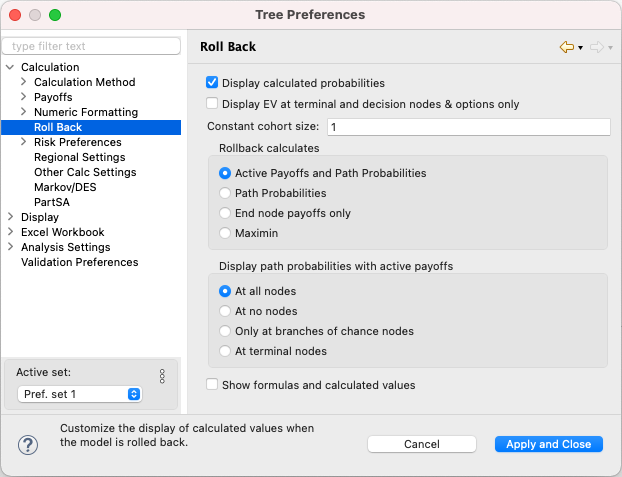
The Roll Back Tree Preferences category allows you to control how roll back analysis results are displayed.
-
Display calculated probabilities: Check this box to display the calculated value of each of the probabilities using numeric formatting preferences during roll back. Turning off roll back will show the original, un-calculated probability expression.
-
Display EV at terminal and decision nodes & options only: Check this box to display expected value roll back boxes only at terminal nodes, decision nodes, and branches of a decision node rather than at every node in the model.
-
Constant cohort size: Multiply roll back value calculations by a cohort size to yield overall values for that cohort size rather than average values per patient.
-
Rollback calculates: There are four options for the roll back display:
-
Active Payoffs and Path Probabilities: Displays the Expected Values for the calculation method's Active Payoffs at all nodes and Path Probabilities at terminal nodes. This is the default setting.
-
Path Probabilities: Displays only the path probabilities for all nodes.
-
Active Payoffs: Displays the Expected Values for the calculation method's Active Payoffs only.
-
Maximin: Select the most pessimistic option at each chance node and the best option at each decision node. This helps you choose the optimal strategy if every uncertain event goes badly.
-
-
Display path probabilities with all EVs: Display path probabilities at every node along with the expected values.
-
Show Formulas and Calculated Values: Displays the formula for payoffs and probabilities along with the calculated values.