34.9 Time dependence and using keywords
Time dependence in Markov models uses the _stage counter. We often see the _stage counter being useful in defining the Markov termination condition. This section will describe other important functions of the _stage counter and other keywords.
34.9.1 Time dependence
Using tables of time-dependent transition probabilities – an example with Background Mortality
The Three-State Markov model in the example files is an example of a Markov chain — a Markov model in which all probabilities and other parameters remain constant over time. In Markov models used to represent healthcare issues, probabilities and other values often vary over time. This kind of model is referred to sometimes as a Markov process.
In the TreeAge Pro Healthcare module, any expression in a Markov model (not just the termination condition) can reference a table of stage-dependent values using the _stage counter. Other kinds of time-dependent expressions can also be created using the _tunnel counter, trackers (in microsimulation models), etc.
This example tutorial requires two things:
-
A copy of the Three-State Markov model from the Health Care tutorial examples: Three-State Markov.trex.
-
A table in the model (which you can add below) called tMort to hold time-varying probabilities. Follow the instructions below to create the table. If you have additional questions about working with tables, refer to the section Creating, Editing and Referencing Tables.
To create a new table for use in a tree:
-
Choose Views > Tables from the toolbar to open to Tables View.
-
Click the "add" toolbar button. This will open the Add/Change Table Dialog.
-
Enter the table name tMort and select the "Use linear interpolation" option for missing rows.
-
Click OK to save the table and close the dialog.
-
In the Tables View, select the table and then click the "add" button in the "Table Rows" section of the Tables View on the right-hand side. Click seven more times to add a total of eight rows.
-
Edit the data in each row to match the data presented below.
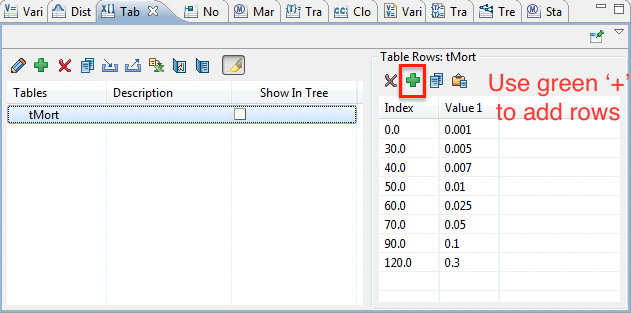
Now we can update the Three-State Markov model to use the new table of mortality probabilities.
Note: If you have a table in Excel you can just copy the data (including column headers) and then paste the information into the table. This saves entering each row of data.
To look up a transition probability in a table:
-
Create a variable startAge and define it with the value 30.
-
This defines the starting age for your cohort of patients.
-
-
Create a variable currentAge and define it with the formula value startAge + _stage.
-
The value of currentAge will increment by one as the cohort ages with each annual cycle as _stage increments.
-
-
Create a variable pDieDisease and define it with the formula tMort[currentAge].
-
The value of pDieDisease will increase with each cycle as currentAge increments and the cohorts move further down the mortality table.
-
-
Select the die branch of the Disease state, and change its probability to the formula pDieDisease.
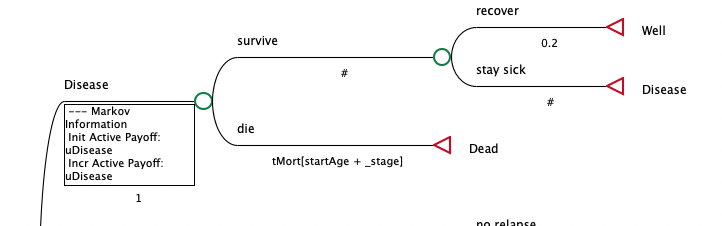
This adjusted model is also in the tutorials as Three-State Markov-Time.trex, which you can open to see the model with the table incorporated.
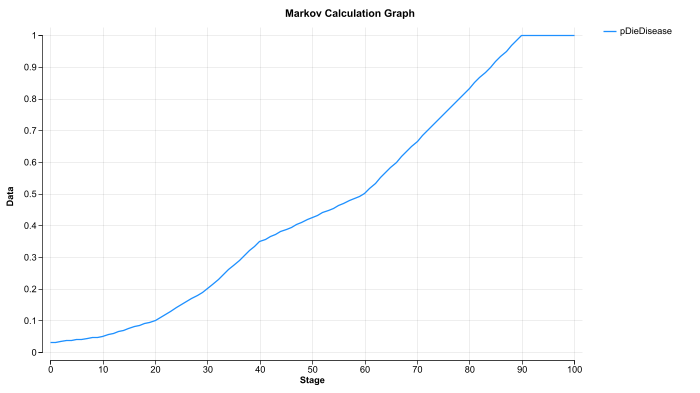
In this revised model, in place of a fixed probability of death in the disease state, TreeAge Pro will calculate the transition probability at every cycle based on increasing age. In the first _stage 0 cycle, pDieDisease will pull the probability from the table at currentAge 30, resulting in a probability of 0.005. By _stage 20/age 50, the probability will have increased to 0.01.
You can review the time-based changes in the probability value for pDieDisease or any other expression using the Markov Calc Plot as shown below.
If you now roll back the tree, the Markov node should display an expected value of 20.744 – significantly higher than the roll back value calculated in the previous chapter because the early probabilities of death in the table are lower than the original 0.01 probability of mortality. The updated tree is available with the name Three-State Markov-Time.trex for your review.
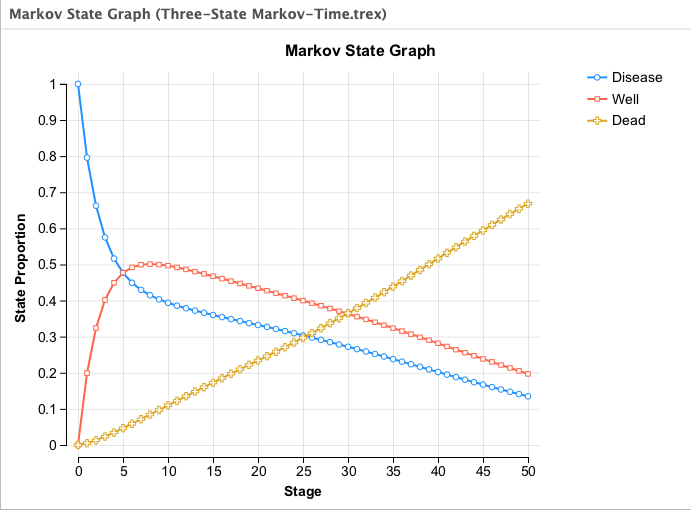
If you run a Markov cohort analysis in the new version of the tree, and compare the new state probabilities graph with the graph generated in the previous chapter, you will see that the cohort transitions to death considerably more slowly.
Below is the State Probabilities Graph from the original model with a fixed probability of death.
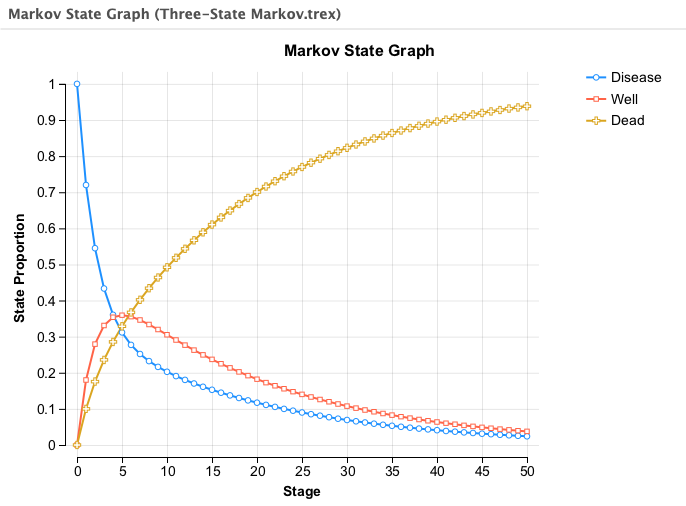
Note the difference in the new model with the probability of death increasing over time.
34.9.2 Markov Keywords
TreeAge Pro provides several Markov keywords — built-in variables which are available only in a Markov node or its subtree. The first two listed in the table below are integer counters.
| Keywords | Definition |
|---|---|
| _stage | The number of cycles that have passed (starts at 0 for first cycle). |
| _stage_mid | Markov cycle counter but midway through the cycle (_stage + 0.5) |
| _tunnel | The number of cycles spent continuously in a tunnel state. |
| _stage_reward | The reward accumulated in the previous cycle for the active payoff |
| _stage_cost, _stage_eff | the reward accumulated in the previous cycle for the active cost and effectiveness payoffs |
| _stage_att1, _stage_att2, etc |
the reward accumulated in the previous cycle for that payoff number (1, 2, etc.) |
| _total_reward | the cumulative reward of all previous cycles for the active payoff |
| _total_cost, _total_eff |
the cumulative reward of all previous cycles for the active cost and effectiveness payoffs |
| _total_att1, _total_att2, etc | the cumulative reward of all previous cycles for the specified payoff number (1, 2, etc.) |
| StateProb( ) | This is a special function for accessing current state probabilities during analysis |
Run a Cohort Analysis on Health Care Example model tree Markov Keywords.trex to see a few of the above keywords written to the calculation trace console. Compare the cohort analysis results to the console and you can see what those keywords do.
The _stage counter is useful in defining the Markov termination condition. This section will describe other important functions of the _stage counter and other keywords.